- Resident Evil Requiem scales very well on GPUs, from older graphics cards to RTX 50 and RX 7000 series, provided the graphics settings are properly adjusted.
- Ray tracing is moderately demanding, but path tracing drives up VRAM usage and drops FPS if DLSS or FSR are not used properly.
- With 8 GB of VRAM you can play without problems in most scenarios, although the jump to 12-16 GB is noticeable in 4K and with advanced ray tracing.
- The latest patches and drivers from Capcom and Nvidia have significantly improved stability and performance, especially on RTX 40 and RTX 50 GPUs.
The arrival of Resident Evil Requiem on PC has put almost all current graphics card ranges to the test, from veteran models to the latest RTX 50 and RX 9000. Capcom has pushed the RE Engine to its limits with new lighting, ray tracing, and trajectory tracing techniques, but at the same time has achieved a fairly scalable title. which can be enjoyed even with modest hardware if it's properly adjusted.
Based on technical analyses and performance tests from specialized media outlets like TechPowerUp, channels like RandomGaminginHD, and materials from manufacturers like NVIDIA and ASUS, a fairly clear picture emerges: Resident Evil Requiem can run on almost any modern PC, but the experience changes dramatically depending on the GPU, VRAM, resolution, and the level of ray tracing you enable.Let's break it down calmly, but without beating around the bush.
Graphics engine, technologies and key visual features
Resident Evil Requiem uses an evolution of the well-known RE Engine, Capcom's proprietary engine that has been accompanying the saga since Resident Evil 7. This release places special emphasis on global illumination, shadows, and reflections, incorporating not only "classic" ray tracing but also path tracing., which represents a significant leap forward compared to Resident Evil Village.
The game combines several advanced techniques: Ray tracing, path tracing, AI-powered ray reconstruction, and various specific solutions for complex elements such as character hair.On screen, this is most noticeable in characters like Grace or in brightly lit outdoor scenes, where the behavior of light, reflections, and shadows takes a remarkable leap compared to previous installments.
In the field of resizing and AI, Resident Evil Requiem supports NVIDIA DLSS (including DLSS 4 with multi-frame generation and Ray Reconstruction) and AMD FSR 3, but surprisingly leaves out Intel XeSS.This significantly impacts how to optimize the game on different GPUs, especially on Intel's Arc GPUs, which have to rely solely on FSR in generic mode.
Visually, analysts agree that it is the most accomplished title using the RE Engine to date: The lighting, facial animations, and level of environmental detail represent a clear leap forward compared to Village.However, there are ups and downs: some interiors seem to be taken from previous installments, while other scenarios are much more elaborate and look practically from a new generation.
Graphics options, interface and menu behavior
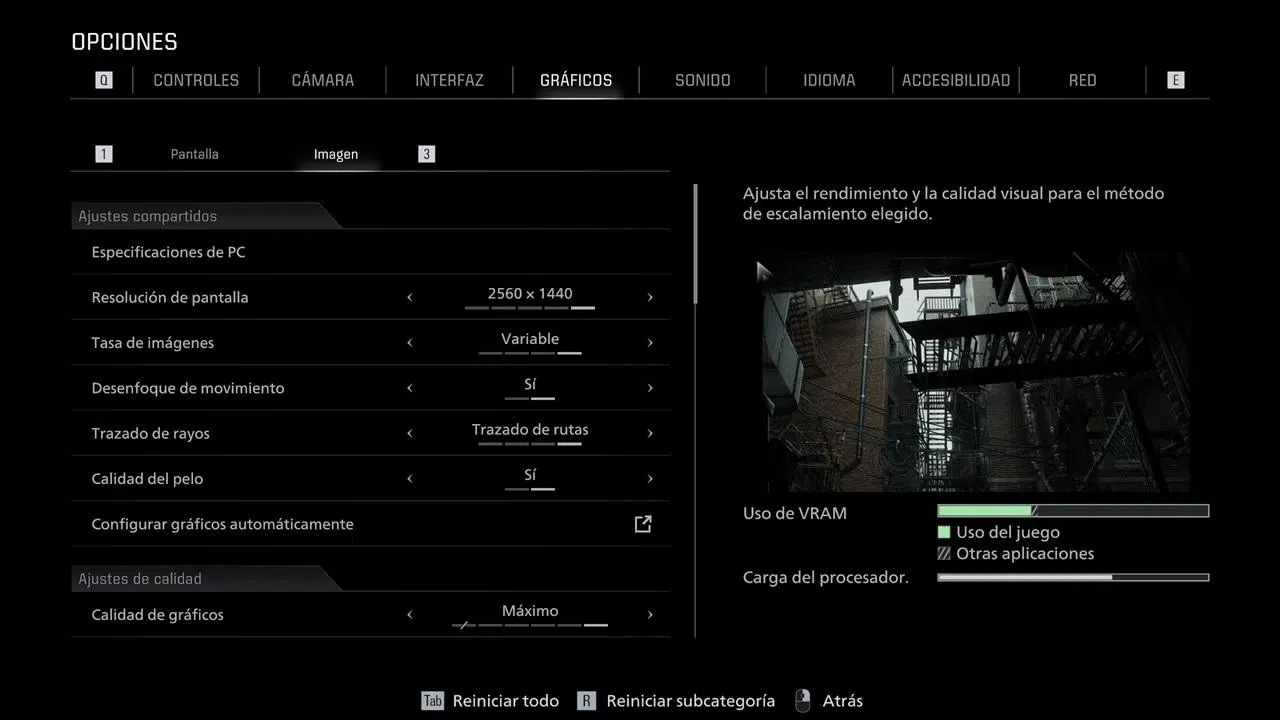
In terms of graphics options, Capcom has provided quite a few tools to adjust performance, although not everything is perfect. The game can be run in windowed and borderless windowed modes, but there is no dedicated "classic" full-screen mode.This may inconvenience some users due to input lag or compatibility with certain overlays.
We can disable V-Sync and Motion blur, as well as adjust usual parameters for texture quality, shadows, and effects. There's no overall artificial FPS cap, but a rather curious bug has been detected: when DLSS is enabled in DLAA mode, the game gets stuck at 60 FPS.It's a known flaw and something to keep in mind if you're fine-tuning your configuration.
There are also questionable design decisions: The game only supports 16:9 aspect ratio resolutionsThis means that if you have a 16:10 monitor, you'll see the typical black bars at the top and bottom, which is rather baffling at this point. Furthermore, the Chromatic Aberration setting is linked to the Lens Distortion setting, so you either activate both or deactivate them both together; there's no middle ground.
TechPowerUp highlights its usual page with interactive screenshots where it compares the different graphic presets. In Resident Evil Requiem there are five base settings, plus at least three additional variations when you activate ray tracing on low or high, or when you switch to Path Tracing.It's a pretty clear way to visualize what you lose in visual quality and what you gain in performance by adjusting these sliders.
These comparisons show that, taking as a reference a configuration with ray tracing enabled, Lowering the overall quality can result in up to 145% more performanceAt the opposite extreme, enabling Path Tracing penalizes around 64% compared to simple ray tracing, with scenes that can range from just 32 FPS to around 230 FPS depending on the combination of settings, resolution and GPU.
VRAM consumption and behavior according to graphics memory
One of the hot spots in Resident Evil Requiem is how it handles video memory. VRAM usage varies greatly depending on quality, resolution, and whether or not ray tracing and path tracing are enabled.to the point of making real differences between models with the same GPU but different amounts of memory.
With the settings at minimum, consumption ranges between 5 and 7 GB depending on the resolution used. When you turn up to maximum quality without ray tracing, the figures jump to a range of 9 to 12 GBThis already places many 8GB graphics cards at an uncomfortable limit, although in practice the game remains playable.
The real bite comes when we combine everything: Ray tracing, path tracing, and 4K frame generation can push VRAM usage to between 15 and 17 GBIn this situation, models with 12 GB or, especially, 16 GB begin to make a difference compared to 8 GB cards.
TechPowerUp's tests show that, without ray tracing, A hypothetical 8GB RTX 5060 Ti and a 16GB RX 9060 XT are practically on par.However, when ray tracing is enabled, a slight advantage appears for the 16GB version, which becomes more noticeable when upscaling the resolution to 1440p and 4K. Even so, in most cases the improvement is around 10% between "twin" models with more VRAM and is only really noticeable in heavily loaded scenarios or at resolutions that are unrealistic for 8GB cards.
This fits with the general idea that 8 GB of VRAM is still sufficient to enjoy the game at almost all resolutions and settings without path tracing, as our requirements guide, while 12-16 GB become recommended if you want to go for the combination of 4K, maximum ray tracing and aggressive upscaling.
Performance without ray tracing: from modest to high-end GPUs
When we disregard ray tracing, Resident Evil Requiem proves to be reasonably hardware-friendly. At 1080p without RT, an RTX 3060, an Intel Arc B580 or an RX 7600 easily exceed 60 FPS Using high quality settings. In the comparison, only the Arc A770 lags slightly behind with around 49 FPS, probably due to driver issues or the engine's implementation on that architecture.
If we go up to 1440p, the demands increase but don't skyrocket. Tests indicate that to comfortably maintain speeds above 60 FPS, you'll need at least an RTX 3060 Ti or an RX 9060 XT., falling just a little short (a little above 50 FPS) are the RX 7600 XT, the Arc B580 and the RTX 4060.
In 4K without ray tracing, the game is already demanding real muscle, but it's still far from being as brutal as other recent titles with Unreal Engine 5 and similar technologies. Starting with an RTX 5070 or an RX 7900 XT, 60 FPS is exceededThis leaves plenty of room for those with a modern high-end device. It's fair to say that at this resolution the game demands significantly more than at 1080p and 1440p, but without reaching unmanageable levels.
This leads us to one clear conclusion: If you're willing to do without ray tracing, Resident Evil Requiem is a fairly manageable and highly scalable title., which adapts from current mid-range graphics cards to older models with some sacrifices in quality and resolution.
Impact of Ray Tracing and Path Tracing on FPS
Enabling ray tracing introduces a leap in visual quality that, according to analyses, does not always compensate for the performance cost. The writers at TechPowerUp are quite critical of the implementation of RT and, above all, of Path Tracing.because they result in scenes with very disparate outcomes that seem to have been unevenly polished by Capcom.
In terms of performance, With ray tracing enabled, the demands don't increase as much as one might fear at 1080p.An RX 9060 XT offers a comfortable experience, and an RTX 5060 averages around 58 FPS, which is perfectly playable without always needing to resort to DLSS or FSR, unless you want extremely high refresh rates.
At 1440p with ray tracing, the required GPU level increases by one step: There is already talk of an RX 7900 XT or an RTX 5070 as a benchmark for smooth performance.It's not an exorbitant requirement for a game of this caliber, but it makes it clear that ray tracing is starting to demand mid-to-high-end graphics cards for resolutions above 1080p.
Things change at 4K, where ray tracing becomes much more demanding. In the tests, only an RTX 5090 manages to comfortably exceed the 60 FPS barrier, reaching an average of 78,5 FPS.The rest of the cards, even very powerful ones, fall behind if DLSS 4 is not used in aggressive modes.
When Path Tracing is activated, the impact is even greater and the comparison becomes complicated, because the game itself forces you to activate DLSS along with Ray Reconstruction, and often also frame generation. This makes the FPS numbers not easily comparable with modes without PT or with simple ray tracingbecause different internal resolutions and different combinations of AI come into play.
DLSS 4, FSR 3 and AI technologies: how to sustain Path Tracing
One of the great strengths of Resident Evil Requiem on PC is its integration with AI technologies to relieve the load on the GPU. On the NVIDIA side, the game takes full advantage of the DLSS 4 ecosystem: Super Resolution, Multiframe Generation, and Ray Reconstruction., in addition to DLAA and Reflex to shape the experience.
DLSS 4 Super Resolution works as an advanced upscaling and temporal image reconstruction. Thanks to its AI models, it allows the use of more aggressive modes (such as Performance or Ultra Performance) while maintaining more than decent visual sharpness and stability.This is key when we activate Path Tracing, since the extra load has to be compensated for somehow.
DLSS Multiframe Generation is perhaps the most striking feature: It is capable of generating up to three frames for every frame rendered traditionally using AI.In practice, this can multiply the apparent FPS rate several times, provided the CPU can handle it and the game is not limited by other factors.
DLSS Ray Reconstruction is automatically activated when using Path Tracing in Requiem. Its function is to intelligently reduce image noise, improving sharpness and, at the same time, lowering the cost of ray tracing compared to traditional denoising solutions.The problem is that the game doesn't allow the use of Ray Reconstruction in other situations where it could also be useful, something that analysts have criticized.
Completing the package are DLAA, which functions as a very high-quality AI-based edge smoothing (recommended only when FPS is plentiful), and NVIDIA Reflex, which It reduces input latency, which is especially useful when using frame generation., which tends to increase it.
On the AMD side, Resident Evil Requiem integrates FSR 3 with its usual quality and performance modes. FSR 3 is key not only in modern Radeon GPUs, but also in older graphics cards or even low-end hardware that needs to squeeze every available FPS out of the system.Furthermore, on devices like the Steam Deck, the community has found that using FSR 3 in Balanced mode allows for a stable 40 FPS, making the game reasonably playable on that handheld.
Performance on older GPUs: GTX 980, GTX 970, and GTX 960
Beyond the monstrous RTX 5090 and company, the title has proven to be surprisingly flexible with veteran hardware. Capcom indicates that Resident Evil Requiem can run even on a GeForce GTX 980, provided the graphics settings are adjusted and certain compromises are accepted.With this card, playing at 1080p with reduced quality and some upscaling is reasonable.
Due to similar performance, A GeForce GTX 970 would also be a valid candidate to run the game at 1080pIt lowers the quality and relies on upscaling techniques to reduce VRAM usage. It may not be as smooth as the 980, but with some patience, a playable experience can be achieved.
The RandomGaminginHD channel went a step further and decided to test the game with a graphics card that costs less than half as much as the game itself in many cases: a GeForce GTX 960 with 2GB of VRAMWe're talking about a model far below the GTX 980, which can be found second-hand for around 25 euros, and which in theory should be out of the question for a title of this magnitude.
To get Resident Evil Requiem to run on this GTX 960, the first step was to reduce all the graphics settings to the minimum. Even so, VRAM consumption exceeds the card's 2GB capacity.The memory usage bar appears completely red, with no room for other processes or for the system itself, which already anticipates lag and performance drops.
At 1080p, with this minimum configuration in a particularly demanding area, the average remains around 18-19 FPS. By activating FSR 3.1.5 in Performance mode, indoor performance increases to an average of around 40 FPS.with occasional peaks of around 50 FPS and occasional drops below 40 FPS. In other words, playable with some reservations.
Outdoors the story changes quite a bit. In Leon's scene, which is very demanding, even with low quality and FSR 3.1.5 in Performance mode, the average frame rate doesn't reach 30 FPS.hovering around 25 FPS. To get close to 30 FPS, you need to use FSR in Ultra Performance mode, but with only 2 GB of VRAM, stuttering and drops below that figure still occur.
Requirements and recommendations for gaming laptops
Resident Evil Requiem is a very popular title on PC, and a good portion of those players also enjoy it on handhelds. Based on specific tests and guides, reasonable performance levels can be established for this platform. The game relies heavily on the GPU and VRAM bandwidth, while the processor and RAM are not as critical, provided a minimum is met..
Regarding graphics card and VRAM, laptops with 4 GB of video memory, such as those with a GTX 1650 Laptop, have a really hard time running it smoothly at 1080p even with the quality settings lowered considerably. With 6 GB of VRAM, as in the RTX 2060 Laptop, an acceptable 1080p experience can be achieved, but with noticeable cutbacks in textures and effects..
To enjoy "comfortably" in 1080p, it is recommended to start with a mobile GPU with 8 GB of VRAM. This includes models like the RTX 3060 Laptop and, of course, the new mid-range RTX 50 Laptop series.If your current gaming laptop has 6 GB or less and you want to get the most out of Resident Evil Requiem with good quality, you'll probably have to think about changing your computer in the medium term.
As for the processor, the game scales well on Ryzen with 3D cache and modern CPUs, but it's not particularly demanding. Any recent mid-range processor is usually sufficient, and examples like an Intel Core Ultra 7 240 or a Ryzen 7 260 already exceed the recommended requirements.More powerful CPUs help to fine-tune minimum FPS and better maintain performance in combination with very fast GPUs, but they are not strictly necessary.
RAM is not an exaggerated bottleneck either. Resident Evil Requiem can run with 8 GB of RAM, although the ideal nowadays is 16 GB in dual channelYou don't need 32 GB of RAM to play games well, so in a laptop it's usually more worthwhile to invest in a better GPU even if the RAM remains at 16 GB.
Where there is a clear requirement is in storage: The next-generation RE Engine requires a fast SSD to properly manage asset streaming.The game can boot from a mechanical hard drive, but the experience will be practically unplayable, with long loading times and possible micro-cuts when loading data.
The recommendation is to have an SSD with read speeds of at least 2.000 MB/s. Modern NVMe drives more than meet this requirement and ensure that textures, geometry, and effects load at the speed the engine expects.also reducing the micro-stuttering that is so annoying in some current titles.
Laptops with RTX 50 Series and ASUS ROG Zephyrus offerings
For those who want to enjoy Requiem with Path Tracing and all the visual flourishes enabled, the RTX 50 Series Laptop range with GPUs is shaping up to be a very interesting option. These mobile graphics cards offer fifth-generation RT cores, full DLSS 4 compatibility, and ample VRAM in their mid-range and high-end models. to maintain quality at 1440p and even higher resolutions in some cases.
At the lower end of this family, a GeForce RTX 5060 Laptop offers a remarkable balance between price, power consumption, and performance. It's a solid option for 1080p with high quality and ray tracing, and even for 1440p if we combine fine-tuned graphics settings and DLSS 4 in Performance modesIn many laptops, 8 GB of VRAM may be the only limit when it comes to raising the bar.
Taking it up a notch, the RTX 5070 Laptop presents itself as a perfect candidate for playing at 1080p with everything enabled and looking at 1440p with guarantees. With DLSS 4 and a little fine-tuning of the settings, this GPU can handle demanding ray tracing without dramatic drops in FPS.However, it is once again at the limit with its 8 GB of VRAM when we talk about 4K and Path Tracing.
If the goal is 1440p as the standard, or even to flirt with slightly higher resolutions in some games, The RTX 5070 Ti Laptop and the RTX 5080 Laptop become especially interestingThe first combines power with 12 GB of VRAM, while the 5080 Laptop goes up to 16 GB, making them ideal candidates for resolutions like 1600p and for playing with intense ray tracing without fear of memory consumption.
At the top is the RTX 5090 Laptop, the most powerful mobile GPU in the catalog, with 24 GB of VRAM. This type of configuration is designed for very high-end laptops with 1600p or higher screens and users who want to get the most out of Path Tracing and multiframe DLSS with virtually no compromises.It's not a product for every budget, but it sets the bar for what can be achieved today on a portable console with this game.
ASUS has updated its ROG Zephyrus G14 and G16 lines with these RTX 50 Laptop GPUs and the latest processors from AMD and Intel. The Zephyrus G14 prioritizes mobility, combining a 10-core, 20-thread Ryzen AI 9 465 APU with 32GB of LPDDR5X RAM and an RTX 5060 Laptop graphics card.Its 2.880 x 1.800 pixel screen works very well with DLSS 4 in Performance mode, allowing you to enjoy Resident Evil Requiem with great visual quality without lacking FPS.
Meanwhile, the ROG Zephyrus G16 aims higher in raw power. They are equipped with Intel Panther Lake processors with up to 16 cores, up to 64 GB of LPDDR5X RAM, and can be configured with graphics cards up to an RTX 5080 Laptop with 16 GB of VRAM.Its 1600p panel fits perfectly with the profile of this GPU, offering plenty of headroom for high-quality ray tracing and upscaling.
Patches, drivers, and current PC performance status
Following the launch, some performance and stability issues primarily affected users of RTX 40 and RTX 50 GPUs, especially in ray tracing mode. Capcom has released its first major optimization patch for PC, focused precisely on improving performance and stability on these graphics cards.While NVIDIA has accompanied the move with specific drivers.
According to the update notes, gamers with RTX 40 and RTX 50 series cards may see performance increases of up to 16% in certain configurations. In addition, NVIDIA has released the GeForce 595.71 driver with game optimizations and recommends installing the 595.76 Hotfix., which addresses power consumption issues and stability errors that could cause system freezes or unexpected application shutdowns with certain equipment.
Along with these performance improvements, the patch introduces additional user interface fixes, such as Dynamic resizing of text boxes to prevent character overflows and localization errors in different languagesThey are small details, but they help to polish the overall PC experience.
Another interesting front is Steam Deck. Although initially Resident Evil Requiem was listed as "not supported" on Valve's handheld console.The first community reports after the patch are moderately optimistic. Taking advantage of the engine optimizations and running FSR 3 in Balanced mode, a stable frame rate of around 40 FPS has been achieved, something many players already consider reasonable for this type of device.
With all this post-launch work, both Capcom and NVIDIA have wanted to make it clear that they take the PC version seriously. The goal is for the game not only to look like one of the most technically advanced titles of the moment, but also to feel stable and well-tuned across a wide variety of configurations., from desktops with RTX 5090 to gaming laptops and more modest systems.
Between media and content creator reviews, manufacturer recommendations, and optimization patches, Resident Evil Requiem has established itself as a highly scalable game: It performs acceptably at 1080p with a GTX 980 or RTX 3060 without ray tracing, is comfortable at 1440p with mid-to-high-end GPUs, and unleashes its full potential with ray tracing and path tracing on the new RTX 50 and RX 7000 series.Provided it's combined with DLSS or FSR and a suitable amount of VRAM, with a few well-adjusted settings, it can be enjoyed on almost any modern gaming PC.
