- Gemini integrates the Lyria model to generate 30-second songs with music, lyrics, and voice from text descriptions and images.
- The feature requires being over 18 years old, using a compatible Google account, and enabling the option to save activity in order to create music.
- Music can be generated both from the guided "Create Music" tool and with direct prompts in the chat, fine-tuning style, language, tempo and lyrics.
- Lyria on Gemini is still a non-professional option, ideal for experimenting and sharing quick clips, but with limitations in precision and creative control.
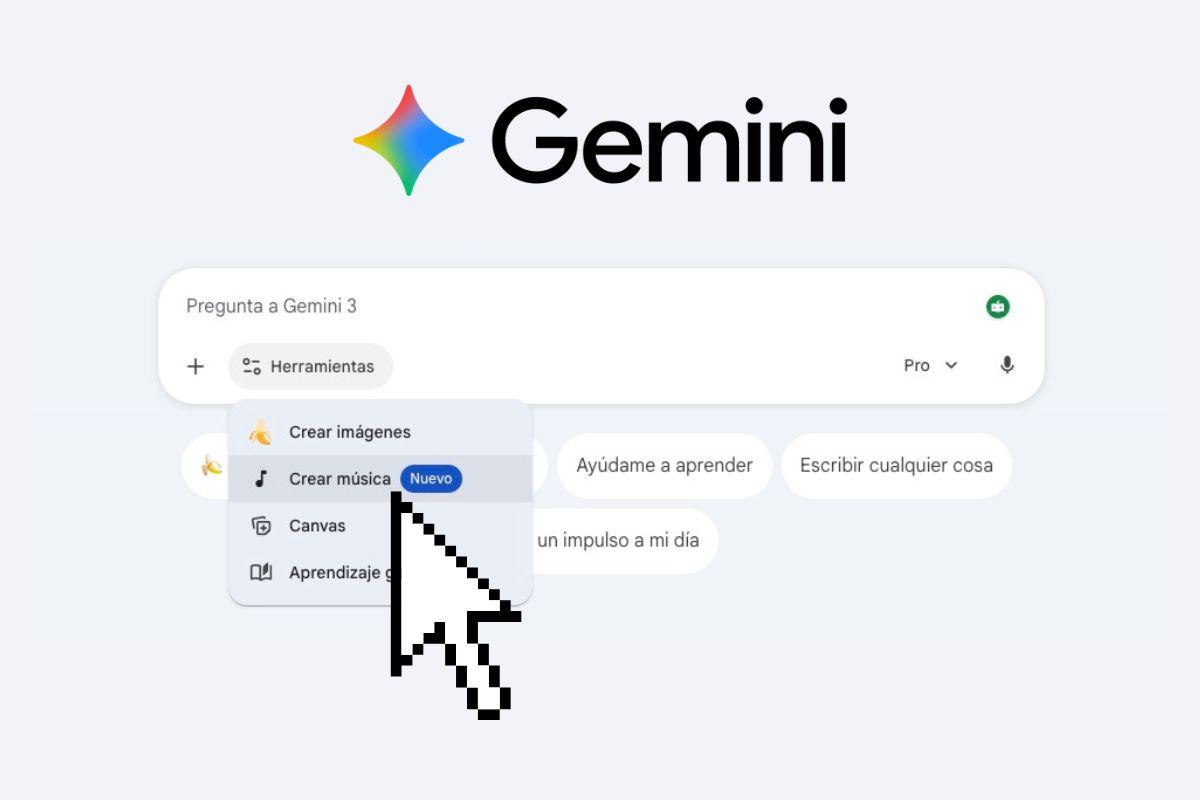
The arrival of Gemini with its musical model Lyria has opened the door for anyone to Create songs with artificial intelligence without knowing music theoryWithout complicated audio software and without needing a home studio. All you need is a well-thought-out script, an internet connection, and a little imagination to turn your ideas into 30-second music clips ready to share.
Although the tool is still in its early stages and is not intended to replace a professional producer, it already allows Create songs with music, lyrics, and vocals in your language almost instantly. In this guide, you'll see step-by-step how to make music with Gemini, what you need to get started, how to take advantage of the prompts, and what its current limitations are, so you're clear on what it can and can't do.
What is Gemini Lyria and what kind of music can it create?
Gemini has internally integrated Lyria, a Google DeepMind model specialized in musical generation from text descriptions or uploaded filesUnlike other AI assistants focused on answering questions, here the goal is to produce complete short musical pieces, with instrumental accompaniment and a voice singing the lyrics you request.
The system is capable of compose songs of about 30 seconds in lengthIt's more like a short clip or an extended chorus than a full-fledged commercial track. It's the perfect length for sharing on social media, using as an intro in a video, or sending to friends, but it still falls short of offering long structures with multiple verses and complex bridges.
One of the most striking things is that She can sing in different languages, including Spanish.adapting both the pronunciation and vocal style to the type of song you describe. You don't need to upload your own voice: Gemini automatically generates a synthetic vocal timbre that interprets the lyrics you create or provide.
In addition, the model accepts input on musical genre, subgenre, mood, tempo, and themeYou can request anything from melancholic pop to festive Afrobeat, including soft ballads, energetic rock, or danceable electronic beats. It won't always perfectly match the style, but it tends to get pretty close to the general idea you're describing.
Requirements to be able to create music with Gemini
Before you start requesting songs like there's no tomorrow, it's important to check what conditions Google imposes for Use the music creation function with Lyria in GeminiNot everyone has access yet, and there are some limitations you should be aware of.
First, Google requires that the user have At least 18 yearsThis feature is not intended for child accounts or minors, so if your account is set up as a minor's account, you will not see the Create Music option in the tools menu.
Also, you need Sign in with a compatible Google accountIt can be a standard personal account or a work or school account, as long as the organization allows the use of Gemini applications. In some corporate or educational domains, the administrator may disable these features, so if you don't see it, it may be due to internal policies.
Another important point is that the option must be activated. “Maintain activity” in your account. Gemini uses interaction history to improve and manage generated content, so if you have activity saving completely disabled, the music feature may not be available or may function in a limited way.
Finally, keep in mind that Google is gradually activating musical creationespecially in the Gemini mobile app. In other words, you might meet the requirements and still not see the tool immediately in your region or on your device, which is quite common when they launch new features.
How to make music with Gemini using the “Create Music” tool
The easiest and most guided way to generate songs is through Gemini's tools menu, where you will find the specific option called “Create music”This method is ideal if you're starting out and want to go step by step, with style suggestions and examples.
The computer process begins by entering gemini.google.com from your browserTo do this, log in with your Google account and, once inside the chat interface, look just below the box where you type your questions or prompts. There you will see a button called Tools, which is the one you need.
Clicking on Tools will display a list of available functions, and among them you should find “Creating music” as one of the optionsIn some cases, Gemini may directly suggest this tool below the text field when it detects that you are starting a new chat, so you have it at hand without having to search for it.
When you enter Create Music, you'll see an interface where you can choose a musical style or a pre-generated beat to work with. Each style includes a small play button so you can listen to a sample and get a clearer idea of the kind of atmosphere your song will create if you choose that beat.
After selecting a style, the key moment arrives: Write the prompt where you describe the song you want.You can specify the genre, subgenre, language of the lyrics, rhythm, emotions you want to convey, preferred instruments, and even some or all of the lyrics you want sung. The clearer you are, the easier it will be for Lyria to capture what you have in mind.
Gemini will take a few seconds to process your request. will internally invoke the Lyria model And when it's finished, it will show you the generated song directly in the chat. You can play it instantly, share it, or request that it be regenerated if you're not happy with the initial result.
Create a song in Gemini with a single prompt from the chat
If you already have experience with other generative AIs or simply want to go faster, you can skip the tool assistant and request the song directly in the chat Gemini. This method is freer and gives you a lot of flexibility when it comes to experimenting.
To do this, open Gemini from your browser or the Android app, and in the text box write a clear request in which explicitly specify that you want a song or musicIt is important that you use words like "song", "musical theme" or "30-second track" so that the system detects that it should use Lyria.
In that same message you can include all the details you can think of: style, language, tempo, voice type, structure, and even specific phrases for the lyricsAn example could be something like: “Create a melancholic pop song in Spanish, 30 seconds, medium tempo, with lyrics about how hard it is to get up early on a Monday.”
When you send the prompt, Gemini will analyze your text, It will recognize that you are requesting music and will automatically launch the Lyria tool. in the background. You don't need to select anything else: the topic will appear in the conversation itself, as if it were just another chat reply, but with an integrated audio player.
From there you can continue iterating in the same conversation. That is, without needing to use Tools again, you can send new prompts requesting changes to the generated song (slower, more cheerful, with different lyrics, etc.) or request that they create a completely new theme from a different idea.
Upload images and files as inspiration for the song
In addition to text, Gemini allows use images and other files as additional context when creating your music track. This option is useful when you want the song to fit a video, a specific photo, or visual material you've already prepared for social media.
From the "Create Music" tool, before entering the prompt, you will see the option to upload files directly from your deviceYou can add photographs, short video clips, or other relevant files; Gemini will use that visual information as a reference for the atmosphere or emotion that the song needs to convey.
For example, you can upload an image of a rainy landscape and request a A quiet piece with piano touches inspired by that sceneOr you could upload a short video of your dog playing and ask for something more rhythmic and upbeat to match those movements. The idea isn't for Gemini to copy the audio from the video, but rather to use it as a creative guide.
In these cases, it's advisable to combine the image with a text description so that the AI has the most complete understanding possible. In other words, don't just upload a file; Explain what feelings you want to convey, what style you prefer, and what lyrics would fit. with what is seen in the image or video.
Also remember that there are limits on the size and format of the files you can upload, and that if the content violates Google's policies (for example, if it is explicitly violent or sexual), the request may be rejected or the system may generate something much more neutral than expected.
How to download, share, and reuse your Gemini songs
Once you have a creation you like, you'll usually want to download it, share it, or use it in other projectsGemini makes these actions much easier, integrating several options directly into the song result within the chat.
As soon as the track is ready, you'll see a player from which you can listen to it directly without leaving the appBelow or next to the player, you'll usually find buttons to share via a direct link, allowing you to send the song by messaging, email, or social media without worrying about the file itself.
If you prefer to have the track on your device, Gemini gives you the option to Download the audio in MP3 formatThis format is perfect for playing on almost any player, inserting into simple video editors, or carrying on your mobile phone without compatibility issues.
Another interesting feature is the ability to download a short video with an automatically generated cover by Google's image template (Nano Banana). This cover usually reflects the style or theme of the song in a very basic way and integrates with the audio to create a clip ready to upload to platforms like Instagram, TikTok, or YouTube Shorts without any further editing.
It's important to note that all songs generated by Gemini They include a hidden watermark called SynthIDThis watermark is inaudible and does not affect the quality of the track, but it serves to identify that the content has been created with AI, something that Google is increasingly applying in its generative tools.
Tips for writing good musical prompts in Gemini
The quality of what you get from Gemini depends heavily on how you phrase your requests or promptsAlthough the model tries to fill in the gaps and understand your intentions, if you give it poor information, it will most likely return a fairly generic song that doesn't quite match what you had in mind.
A good starting point is clearly specify the genre or at least the general setting You need to specify what you're looking for. Asking for "something upbeat" is not the same as asking for "a cheerful Afrobeat track with driving percussion and synthesizer melodies." The more specific you are about the style, the closer the result will be to what you expect.
It also helps a lot to indicate the language of the lyrics and the type of message you want to conveyFor example, you can ask for “a song in Spanish about a dog that hates the rain, with a funny tone and a catchy chorus.” This gives the AI thematic and emotional context so it doesn't generate generic lyrics that have nothing to do with you.
If you have a few phrases in mind that you want to appear, you can Include keywords or even entire stanzas within the promptGemini can use those parts as the basis of the lyrics, although he won't always respect them 100% word for word, as he tries to make them fit the meter and melody he creates.
Don't forget to mention the approximate tempo (slow, medium, fast) and basic structure If you're interested in something more defined, for example: "starting with a soft intro, then a powerful chorus, and ending with a short instrumental coda." Even if the duration is only 30 seconds, the model can distribute the content in a more organized way.
Finally, if the first attempt doesn't convince you, don't hesitate to try again. request adjustments to the resultYou can tell them things like, “Do a slower version,” “Change the lyrics to be more upbeat,” or “Keep the melody but lower your voice.” Refining it through iterations usually yields better results than trying to get it perfect on the first try.
Limitations, current quality and “non-professional” use of Lyria
Although the idea of Gemini composing music sounds spectacular, it's best to be realistic: Lyria 3 integrated into Gemini is still a rather immature feature if we compare it with tools dedicated exclusively to music production with AI.
Many tests have shown that AI does not always follow the specific instructions to the letterIf you request a very specific subgenre, a very marked rhythm, or a very clear message in the lyrics, the result may fall short or only vaguely resemble what you have described.
The duration is limited to The fact that about 30 seconds per song greatly influences the type of compositions that are possibleWe're talking more about jingles, intros, short hooks, or loose musical ideas than complete songs with several well-defined sections and narrative development in the lyrics.
Therefore, in its current state, it makes more sense to see it as a playful, experimental or quick sketching toolThis is useful for getting inspired, creating something fun to share, or having a simple base to then work on in a more advanced audio editor.
If what you need is Almost total control over the lyrics, vocals, mixing, and styleThere are alternatives like Suno AI that currently offer a more professional workflow and more consistent results. Gemini is improving over time, but it's not quite there yet, so it's not advisable to base a serious music project solely on what it generates.
In any case, the fact that it's integrated into Gemini's own assistant, alongside text, images, and other functions, makes it a very accessible and easy-to-try creative toyespecially for people who have never used a DAW or synthesizer in their lives and just want to turn a crazy idea into a small, shareable track.
With everything Gemini offers for creating music with Lyria—from the guided "Create Music" tool to free-form chat prompts, image uploads, MP3 downloads, and social media-ready videos—it has become a quick way to go from a simple text description to a full music clip in a matter of secondsAs long as you understand that their 30-second songs are more of a space for experimentation and fun than a substitute for professional production, they can give you plenty of room to come up with ideas, surprise someone, or generate tracks that you can then refine with other, more powerful tools.